


SmartQMAN Standard
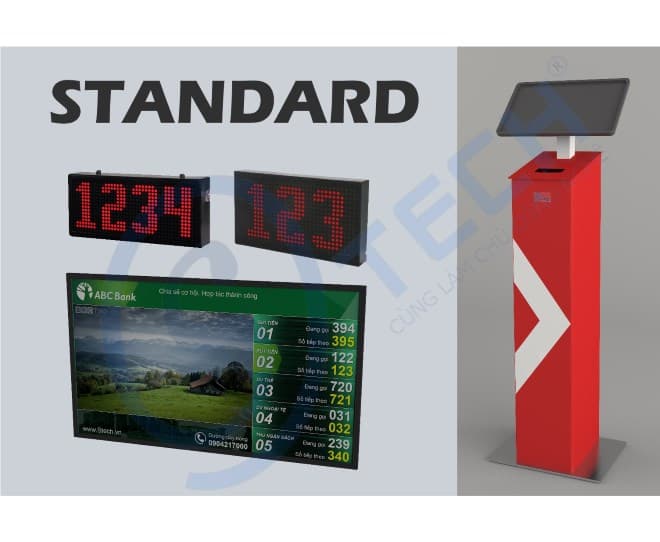
KEY STRENGTHS
The STANDARD package provides a standard feature set that covers a wide range of business processes, giving the organisation a proven transaction model and a visible difference in service quality at its branches:
- A queue management system with an interactive touchscreen and standard wireless connectivity.
- A system for rating service quality, staff performance and attitude towards customers.
- Devices can run wirelessly and are attractively designed.
- Multi-dimensional transaction reports across the system.
SUITABLE FOR:
Medium and large customers such as banks, hospitals, telecoms operators, public administration offices, customer service and warranty centres, branch offices and retail stores.
CORE FEATURES
Handles almost any operating process
Designed on a configure and run principle with a customisable process engine, SmartQMAN Standard is a complete queue management solution able to serve the real business processes in use at the organisations that deploy it.
Large-format display devices
In large premises the system can keep information legible through oversized counter displays, so customers can follow their ticket number easily.
Displays that combine varied content
With a large LCD central display, information from the queueing system and any other content the organisation wants to show its customers becomes simple and varied to present.
Queue-calling software integrated into the PC
The counter control software (SRCU) runs on the staff member's PC, saving desk space and making interaction with the queueing system convenient.
Service quality voting
To raise service quality and to measure staff performance, the voting keypad lets customers send their assessment of the attitude and quality of the service they received.
Report storage and viewing
Reports retain the essential facts — time, volume, quality, rating scores — and can be exported as text so that managers can review and assess staff and customers.
Full spoken call phrases
The system can announce queue numbers in complete, polite and varied phrases. For example: "Customer number ABC, please come to the reception counter."
Language switching
The user interface is multilingual and easy to switch between languages for different groups of customers.
Customisable user interface
The interface, logo and banners on the ticket kiosk can be changed to each organisation's requirements.
Separate audio zones
The system can separate audio between floors, buildings and areas that have different audio requirements.
Connects to specialised management software
The system can connect to the specialised management software used in hospitals, banks, complexes and branch offices, so that ticket numbers stay in step across the functions of several different processes.
Friendly, easy-to-use software
The interface is friendly and easy to use for both administrators and customers, in Vietnamese and English (or another language of your choice).
Ticket recovery
The system can restore ticket numbers after a power cut or computer failure that stops it unexpectedly, with a single click.
Self-protection during an unexpected power cut
The system keeps running for at least 30 minutes during a power failure, so the administrator can take the steps needed to shut it down properly and protect the equipment's service life.
Automatic clean-up and data retention
Automatic clean-up and archiving keep the system running at full speed.
Room to extend
The system also offers optional extension interfaces that connect to many different hardware and software modules, to meet the varied and specific requirements of each organisation.